Jaimy Heijstee
Product Marketing Manager


Multi-Level Board Support in Tracket
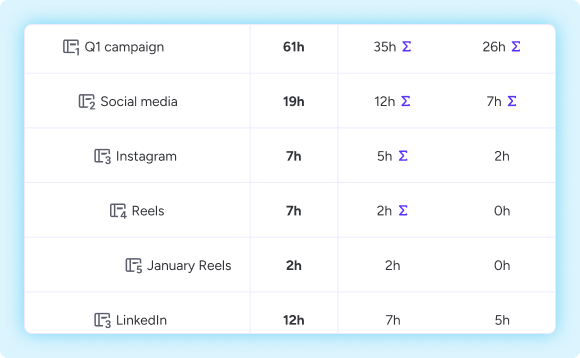
monday.com recently introduced multi-level boards, allowing multiple levels of subitems are available on both regular boards and projects. Tracket now fully supports creating a time entry on all levels of subitems on multi-level boards. (read more about multi-level boards on monday.com)
Logging Time
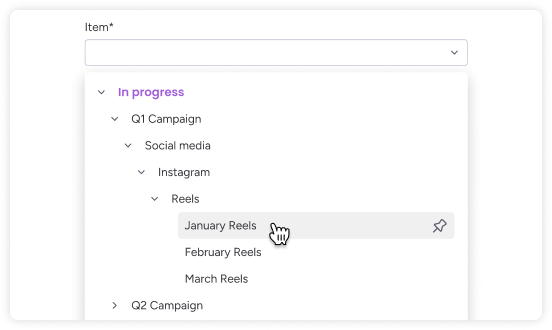
Logging time on multi-level boards works just like you're used to. The time entry form shows your boards and items. From there, you can navigate the hierarchy by expanding items to find the right level, or use search to find the right item.
If you open an item directly from your board, you can log time straight from the item view without going through the selector at all.
Reporting
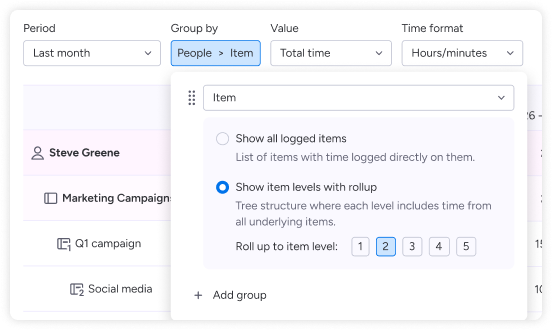
Reports now understand the full structure of a multi-level board. You can report per level, roll up time across levels, and the 'group by item' option has new options to see time broken down per subitem or rolled up across the hierarchy. Filters work across all levels too.
Dashboard widgets
The Tracket dashboard widgets have been updated to correctly reflect time tracked across all levels of a multi-level board.
One thing to know if you use automations
Multi-level boards have rollup columns enabled by default. For Tracket automations to work correctly, you'll need to turn these off on your multi-level boards. We recommend doing this before you start tracking time on them.


Avisi Apps B.V.
Nieuwe Stationsstraat 10
6811 KS Arnhem
KvK: 76632490
BTW: NL860713659B01


.svg)
.svg)


We use cookies on our website to enhance your browsing experience. Some of them are essential, others are optional. Because we respect your right to privacy, you can choose not to allow personalized cookies. Learn more
Functional cookies